
HypeServ Panel 1.7 - Content & Filemanager
Hey all,
we have a big announcement: HypeServ Panel 1.7 is here. After doing a lot of infrastructure work recently, our goal for this next release was quite simple: less setup, more playing. You can now finally order a server with your favorite modpack pre-installed and manage mods, plugins and their updates seamlessly with the updated content-manager. Oh and we also made some major upgrades to the filemanager that many of you asked us about.
But let’s go through things one by one.
Pick a pack. Play in seconds.
Now, when you order a Minecraft server, you can now pick from a selection of tested modpacks right away: Monifactory, All the Mods 10, Star Technology, Nomifactory CEu and more. HypeServ Panel automatically installs the latest version of the pack and your new server comes online with the modpack pre-installed. No uploads, no setup hassle.
For this to work we have completely reworked how the Panel handles modpack installs and handles modpacks. Our mcmp-installer - open source btw ;) - has received some major upgrades to be compatible with a ton more modpacks and resolve most cases where modpack installs would previously fail. It also supports updating modpacks while keeping all your files, compared to having to reinstall the entire server as previously.
Updates in one click.
As I just described, when a new version of your modpack is released, the panel now shows a convenient "Update available" chip next to your packs version. Simply click on it and pick the version you want. Your world is retained. If you'd rather start over, you can also simply choose to create a fresh world instead. If you go to the content manager tab, you can also switch to a different modpack entirely from there.
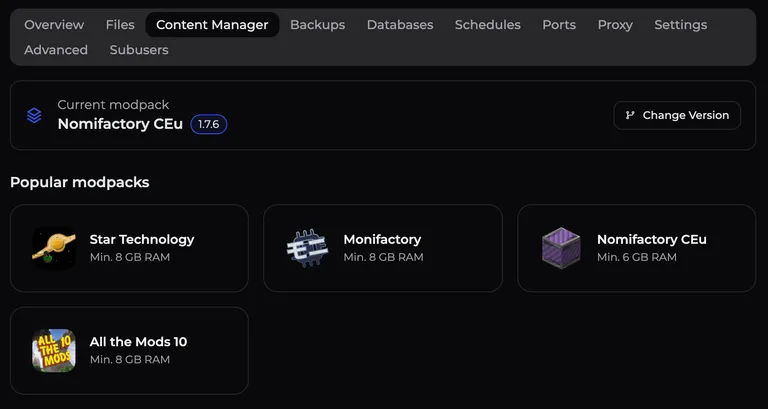
Every mod, now also one click
Oh and thank to a new system we conveniently call modpack-magic (I know very crative name, but forgive us - we’re german after all and it’s better than mcmp-installer) the Content Manager now searches CurseForge, Modrinth, Hangar, SpigotMC and FTB at once. It automatically knows your installed Minecraft version and loader, so it only shows you versions that actually fit your server.
Found what you need? You can install it with a single click, or choose from (compatible) versions as well. If the mod needs other mods to run, the panel can even find the missing dependencies and install them too (*depending on the provider)!
Oh and you can update stuff now!
Yes, you heard correctly, thanks to these new systems, the panel knows all of your installed mods and plugins and shows them in one convenient list. We even flag outdated ones, and you can update them one by one or all at once.
Drag. Drop. Done.
I know a lot of you had some “input” regarding the filemanager, we already did a large overhaul previously this year which solved a lot of issues, but we’ve now sat down with all the feedback we’ve since gotten and really pushed things to a new level. (am I even allowed to say “pushed to next level” as a human in 2026?) But anyways, the file manager now works much more like the one on your computer:
Drag & drop: select several files (using shift or CTRL/CMD) and drop them onto any folder.
Right-click menu: edit, download, copy path, cut, duplicate, move, rename, archive or delete, right on the file or folder.
Cut. Paste. Done. Cut files, and simply paste them somewhere. Or right-click a folder and choose "Paste into folder". Keyboard shortcuts work too (for example ⌘X / Ctrl+X, F2 to rename, Del to delete).
Move dialog: Yeah for all of you who don’t like keyboard shortcuts, you can now visually pick the target folder or type a path when moving files.
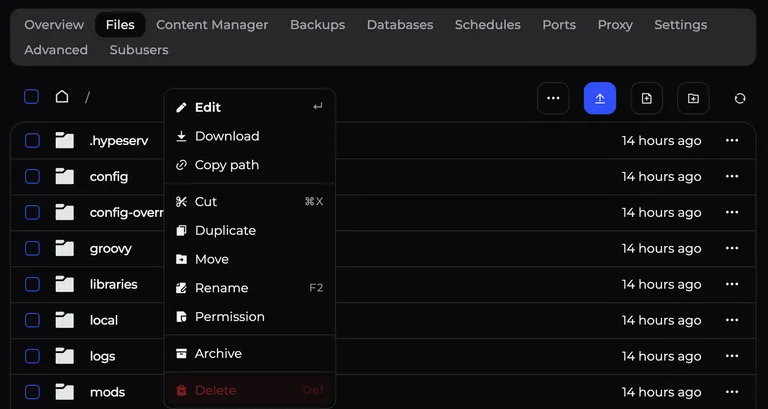
And FINALLY: Back means back.
I can assure this one annoyed us in the team just as much as you guys! But hey, we finally di it: Tabs and filemanager navigation are now part of your browser history. What that means? When you press back in your browser or on your mouse, you actually go to the folder or tab you just came from, not to a page from 10 minutes ago. Crazy stuff, I know…
Some other new things
Ordering on our website is now way better: you can configure software or modpacks, package and runtime directly on the product page, and then checkout quickly in the panel. It also works better on mobile and finally remembers what you wanted to buy across login, registration and even email-verification!
We also recently added "Save & Close" in the file editor, plus progress messages for compressing, extracting and backups. (sounds like a small thing but it really makes a difference while waiting on a backup creation/restore!)
Many smaller (bug-)fixes across the panel.
Try it now
All features are live in your panel today (actually since yesterday already).
Looking for a new server? Pick your modpack and start playing on our new Browse modpacks page!
Is there still something not working as expected, or you’re missing a modpack you'd like to see in the preset ones? Join us on Discord and tell us there!
Enjoy the new features and tell us what you think.
Oh and I almost forgot :p
Thanks for being a part of HypeServ <3


 Product


