How to Install Create: Aeronautics on Your Minecraft Server

Create: Aeronautics is a mod extension for the popular Create mod that lets you build your own airplanes and airships in Minecraft. These vehicles move in a highly realistic manner, allowing you to walk around on them mid-flight and operate machines — turning your builds into fully functional flying bases to explore the world.
⚠️ Create a backup before installing any mods!
How to Install the Mod on Your Server
There are two ways to get the mod running on your server.
Installing via Modpack
The easiest way to use Create: Aeronautics on your HypeServ server is through the ready-made modpack All of Create – Aeronautics. This package bundles the main mod along with additional compatible add-ons that meaningfully enhance the gameplay experience.
Since this is a very extensive mod, occasional errors may occur, these are generally not caused by HypeServ.
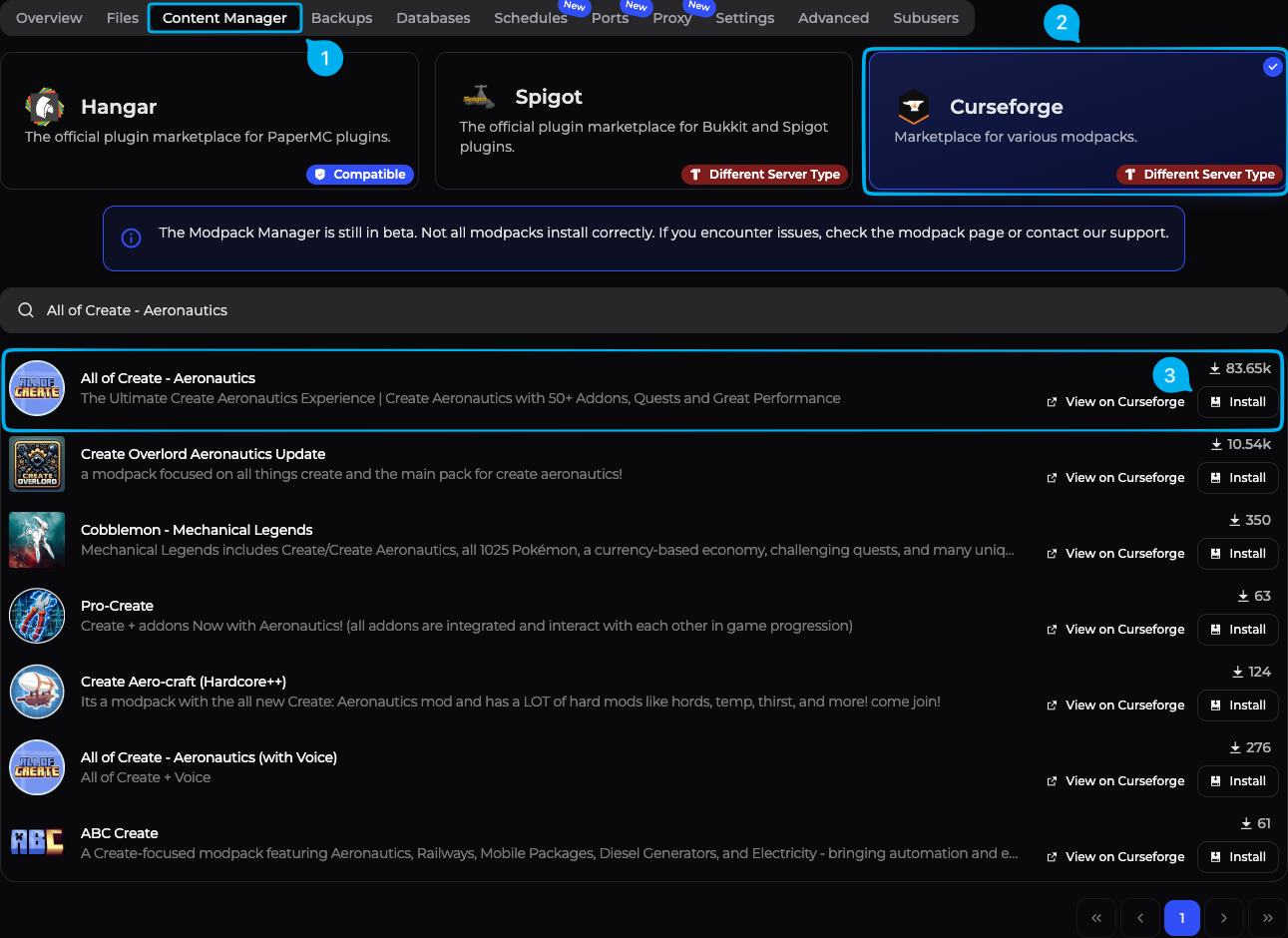
Prepare your server: Log in to your HypeServ dashboard and stop your server before making any changes.
Create a backup: Under the Backups section, create a snapshot of your current server state so you can roll back if needed.
Open the Content Manager: After selecting your server, click on Content Manager in the top navigation bar to access installable content.
Select CurseForge: In the Content Manager, choose the CurseForge category — this is the modpack marketplace where you'll find the package.
Search for the modpack: Type "All of Create – Aeronautics" in the search bar. While not the official package from the mod developers, it's an ideal bundle that includes the main mod plus useful extra extensions, making setup especially straightforward.
Start the installation: Click the Install button on the modpack. The server will automatically download all files and configure your server.
Start your server: Once installation is complete, start your server again.
Important: To join the server, you must also have the same modpack (All of Create – Aeronautics) installed locally in your Minecraft launcher (e.g., CurseForge or Prism). Make sure the versions on the server and your PC are identical.
Installing Create: Aeronautics Without a Modpack
1. Requirements
For Create: Aeronautics to work, you need at minimum:
Minecraft version: currently 1.21.1
Mod loader: NeoForge (set this under Server Type in your server settings)
Required mods:
All three mods can be downloaded via Modrinth.
2. Stop Server & Create Backup
Open your Minecraft server in the HypeServ panel.
Click Stop to shut down the server.
Create a backup under the Backups section in case you want to revert later.
3. Download the Mods
Download Create, Sable, and Create: Aeronautics from Modrinth using the links above.
4. Upload Mods to Your Server
You can upload files either via the file manager in the panel or via SFTP — the process is identical to any other Java mod.
Option A – File Manager in the HypeServ Panel:
Open your server in the panel and navigate to Files.
Go into the
mods/folder.If no
modsfolder exists, create one with exactly that name.Upload the downloaded
.jarfiles into themodsfolder.
Option B – SFTP:
Connect to your server with an SFTP client (e.g., FileZilla or WinSCP) using the credentials from your HypeServ panel.
Navigate to the server's root directory and open the
mods/folder.Drag all
.jarfiles into this folder.
At the end, your server should have a mods folder containing all required files.
5. Restart & Verify
Go back to the HypeServ panel and start your Minecraft server.
Switch to the Console tab while it boots up and check that Create, Sable, and Create: Aeronautics load without error messages.
Pay special attention to errors related to:
Wrong Minecraft version
Wrong mod loader
Missing dependencies
If errors occur, double-check the versions of all mods and the mod loader and adjust accordingly.


 Product